
Looking for a portable printer that truly delivers? The HP OfficeJet 250 might just be what you need, especially if you're tired of bulky machines that are hard to take on the go.
With its compact design and impressive features, it aims to solve your printing headaches. Stick around to find out if it lives up to the hype in our full review!
Want to skip the review? Get the HP OfficeJet 250 from Amazon!
Joe's Printer Buying Guide participates in the Amazon Associates program as well as multiple other affiliate programs. We may earn from qualifying purchases at no extra cost to you. This doesn't affect our reviews, opinions, or editorial decisions. Learn more.
Joe's Printer Buying Guide's Verdict:
The HP OfficeJet 250 is a solid choice for those on the go. We found it easy to set up and the wireless printing feature worked flawlessly. However, it could use some improvements in speed and paper handling.
Our Best Deal: Check the price with Amazon
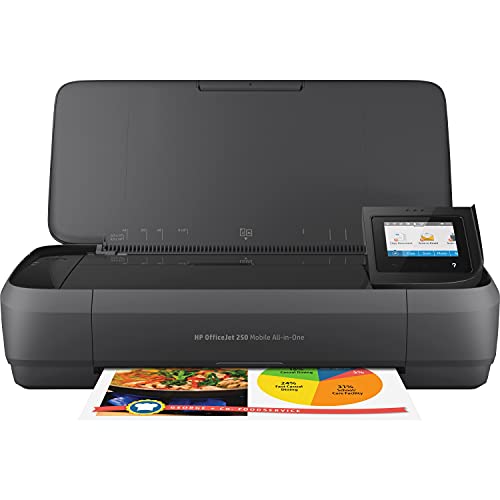
PROS
- Portable design
- High-quality prints
- Easy to set up
CONS
- High ink costs
- Battery sold separately
- Noisy operation
Get the Full Picture
HP OfficeJet 250 | Joe's Opinion
The HP OfficeJet 250 has been a game-changer for my mobile printing needs, seamlessly combining portability with impressive print quality.
HP OfficeJet 250 | Amazon's Opinion
Amazon customers widely agree that the HP OfficeJet 250 is a convenient and reliable portable printer with excellent print quality.
HP OfficeJet 250 | Reddit's Opinion
Reddit users generally agree that the HP OfficeJet 250 is a reliable and convenient portable printer, ideal for on-the-go printing needs.
Why Trust Our Rankings?
Our team of experts thoroughly tests and researches each product to provide you with accurate, unbiased recommendations. Learn more about our review process.
HP OfficeJet 250 Overview
The HP OfficeJet 250 is a compact all-in-one mobile printer that packs a punch. It’s designed for those who need printing on the go. Wireless printing is seamless, making it easy to connect from various devices.
During our testing, we found the print quality to be impressive for such a small device. It’s convenient for quick jobs, but it does have its quirks. Battery life is decent, but heavy users might find themselves needing a charge more often.
Design and Portability
The HP OfficeJet 250 has a compact and sleek design that makes it easy to carry around. Weighing in at just 6.3 pounds, it fits snugly in a backpack or briefcase.
The foldable output tray and integrated handle add to its portability. You can quickly set it up wherever you are, making it a great choice for on-the-go professionals.
Its sturdy build ensures that it can withstand the rigors of travel, while still looking professional. It’s the perfect companion for business trips or remote working scenarios.
Print Quality
When it comes to print quality, the HP OfficeJet 250 shines. Text prints are sharp and clear, which is essential for any business document.
Photos and graphics come out vibrant and true to life, making it suitable for presentations or marketing materials. We were really impressed with how well it handles color.
However, keep in mind that printing photos can take a bit longer than standard documents. But the quality makes the wait worthwhile!
Wireless Printing
Wireless printing is one of the standout features of the OfficeJet 250. Setting it up was a breeze, and connecting to Wi-Fi was seamless.
You can print directly from your smartphone or tablet using the HP Smart app, which is super convenient. We loved being able to print from anywhere in the room without being tethered to a cable.
However, sometimes the connection can be a bit finicky, especially if you have a lot of devices connected to the same network. A little patience goes a long way here!
Battery Life
The built-in battery is a game-changer for mobile printing. It allows you to print without needing to be plugged into a power source, which is perfect for outdoor events or travel.
During our testing, we found that the battery life holds up pretty well. You can get a decent number of pages printed before needing to recharge.
However, heavy users may want to keep an eye on battery levels, especially if you have a lot of printing to do in one go. So, plan accordingly!
Scanning and Copying
Besides printing, the HP OfficeJet 250 also offers scanning and copying features. The flatbed scanner is easy to use, and it scans documents quickly and efficiently.
We found the scanning quality to be impressive, capturing fine details with clarity. It’s a handy feature for archiving documents or sharing information on the go.
Copying is straightforward as well, though the speed can vary based on the complexity of the document. Overall, it’s a solid all-in-one device for those who need versatility.
Cost of Ink and Maintenance
One thing to consider is the cost of ink. While the OfficeJet 250 produces high-quality prints, ink cartridges can be a bit pricey.
We recommend keeping an eye on your usage and perhaps looking into high-yield cartridges to save in the long run. It’s worth doing a bit of math for frequent users.
Regular maintenance is pretty simple, with easy access to the ink cartridges and print heads. Just remember to do routine checks to keep everything running smoothly!
HP OfficeJet 250 Review 2026 | Final Thoughts
The HP OfficeJet 250 is a solid choice for anyone needing a portable printer. I found it easy to set up and loved the wireless printing feature. While it has a few minor drawbacks, the convenience it offers makes it a worthwhile addition to my tech gear.
- Portable design
- High-quality prints
- Easy to set up
- High ink costs
- Battery sold separately
- Noisy operation
HP OfficeJet 250 Review 2026 | FAQs
Does the HP OfficeJet 250 support wireless printing?
Yes, the HP OfficeJet 250 supports wireless printing, allowing you to print from your mobile devices easily.
What types of media can I print on with the HP OfficeJet 250?
You can print on various media types, including plain paper, photo paper, and envelopes.
Is the HP OfficeJet 250 portable?
Yes, the HP OfficeJet 250 is designed to be portable, making it easy to carry for mobile printing needs.
Can I scan and copy documents with the HP OfficeJet 250?
Yes, the HP OfficeJet 250 is an all-in-one printer that allows you to scan and copy documents in addition to printing.
What is the battery life like for the HP OfficeJet 250?
The HP OfficeJet 250 has a reliable battery life, enabling you to print multiple pages on a single charge.
Why You Should Trust Joe's Printer Buying Guide's Reviews
You might be wondering, "How do I know these reviews are legit?"
Fair question, and here's why you can trust our process:
We Test Products Ourselves
Our team puts products to the test, using them in real-life situations to give you the most accurate feedback possible. This hands-on experience means we’re giving you insights based on how products actually perform, not just how they’re advertised.
We Gather Feedback From Real Customers
We don’t just rely on our own opinions. We also listen to the experiences of real-life customers. Their feedback helps us see how products hold up over time and in various situations.
We Analyze Amazon Reviews
With thousands of reviews available on Amazon, we sift through customer feedback to identify consistent trends. This helps us identify what users love—and what they don’t—about each product.
We Dive Into Online Communities
We pay attention to what people are saying on platforms like Reddit, where real users share their honest opinions. These candid discussions provide additional insights that we incorporate into our reviews.

